Google local ranking factors: how Google decides which shops to show
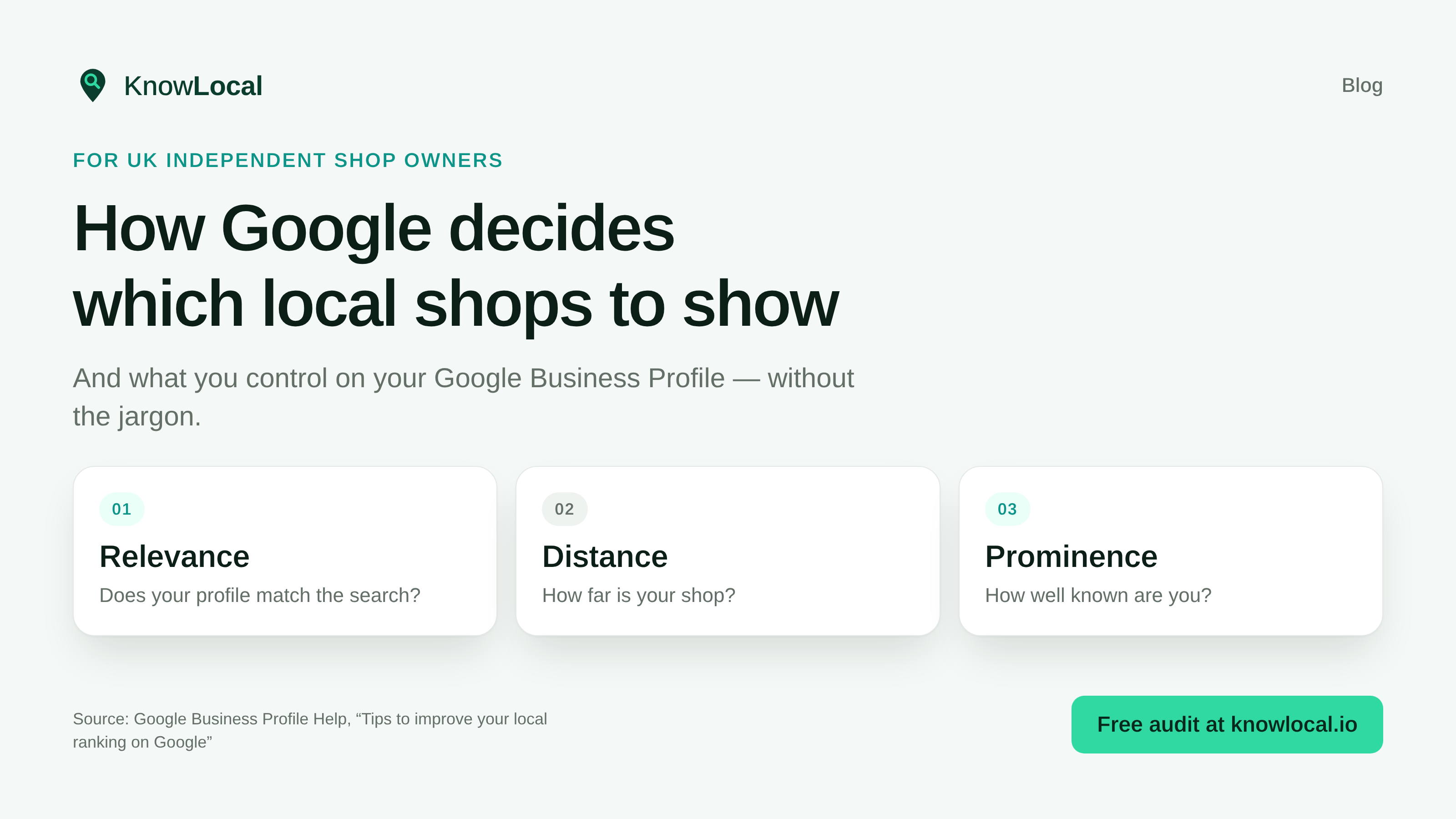
When someone searches “book shop near me” or “best bakery in Ludlow”, Google tries to show nearby businesses that match what they want. That decision is what people mean by Google local ranking factors, and it is how Google decides which shops to show in Maps and the local pack.
Google publishes the ingredients in Tips to improve your local ranking on Google. Local results are mainly based on relevance, distance, and popularity, with the third explained under Prominence.
This guide is for UK independent shop owners. Plain English. No invented scores. Just what Google says, and what you control on your Google Business Profile.
What are Google’s local ranking factors?
Google ranks local results mainly on three things: relevance (does your profile match the search), distance (how far your shop is from the searcher), and prominence (how well known you are). Together they decide who appears in Maps and the map pack. There is no paid shortcut.
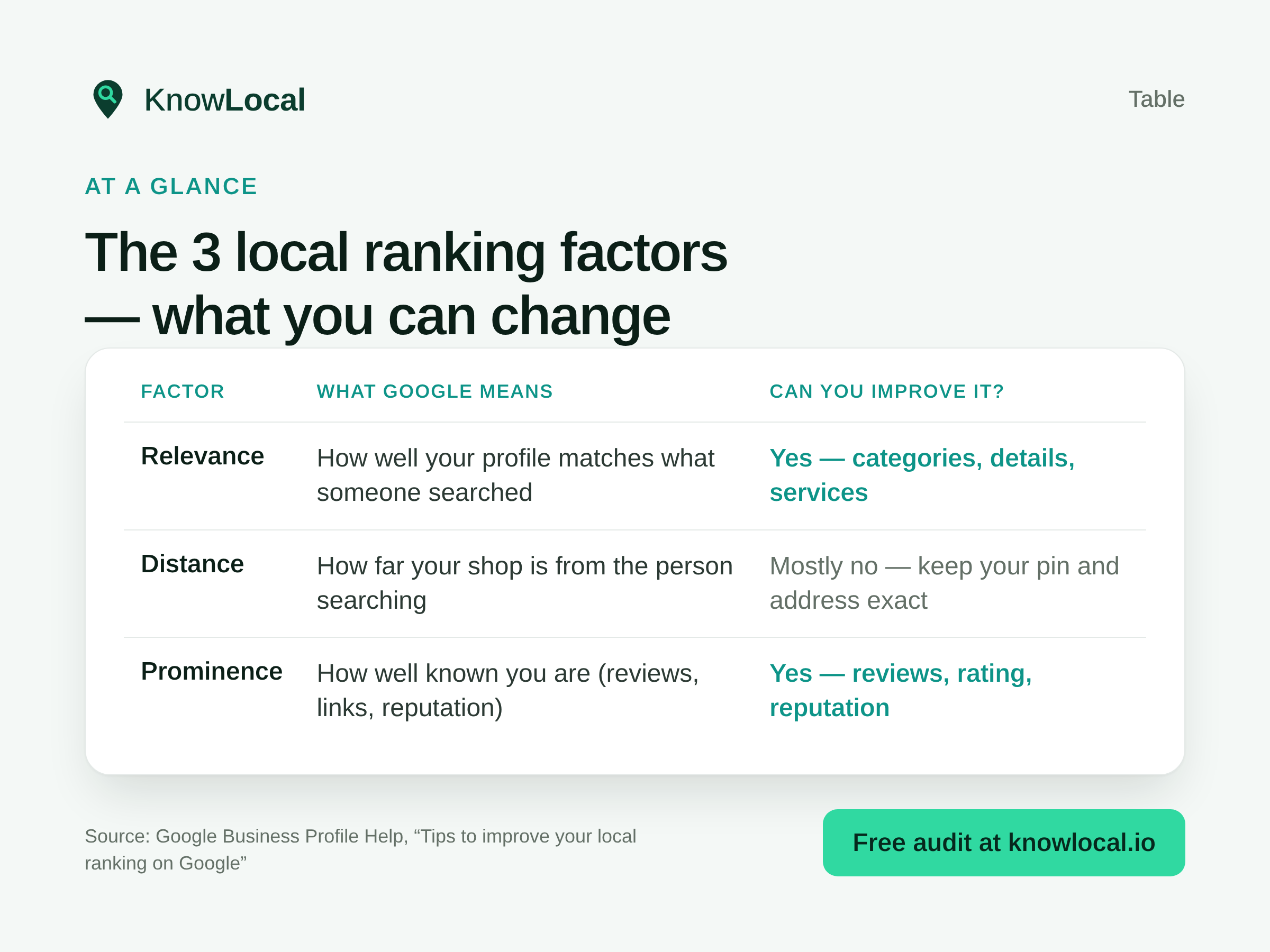
| Factor | What Google means | Can you improve it? |
|---|---|---|
| Relevance | How well your profile matches what someone searched | Yes: categories, details, services |
| Distance | How far your shop is from the person searching | Mostly no: keep your pin and address exact |
| Prominence | How well known you are (reviews, links, reputation) | Yes: reviews, rating, reputation |
Google is clear: there is no way to request or pay for a better local ranking.
Why is my business not showing on Google Maps?
First search your exact business name on Google Maps. If you appear by name but not for “book shop near me”, you are listed. The issue is ranking (relevance and prominence), not a missing profile. If you do not appear by name either, check verification, suspension, duplicates or a recent edit still updating (Google says changes can take up to three days).
Google’s Find your business on Google help also notes that rankings for new businesses can take up to a month to appear, and that a suspended profile will not show until you fix the guidelines issue.
How does Google rank local businesses?
Google ranks local businesses by weighing relevance, distance and prominence together for each search. A perfect category will not beat a closer, better-reviewed rival on every query, and a shop three streets away with a weak profile can still lose to a complete, well-reviewed neighbour. Work all three, starting with what you control.
Relevance: do you match the search?
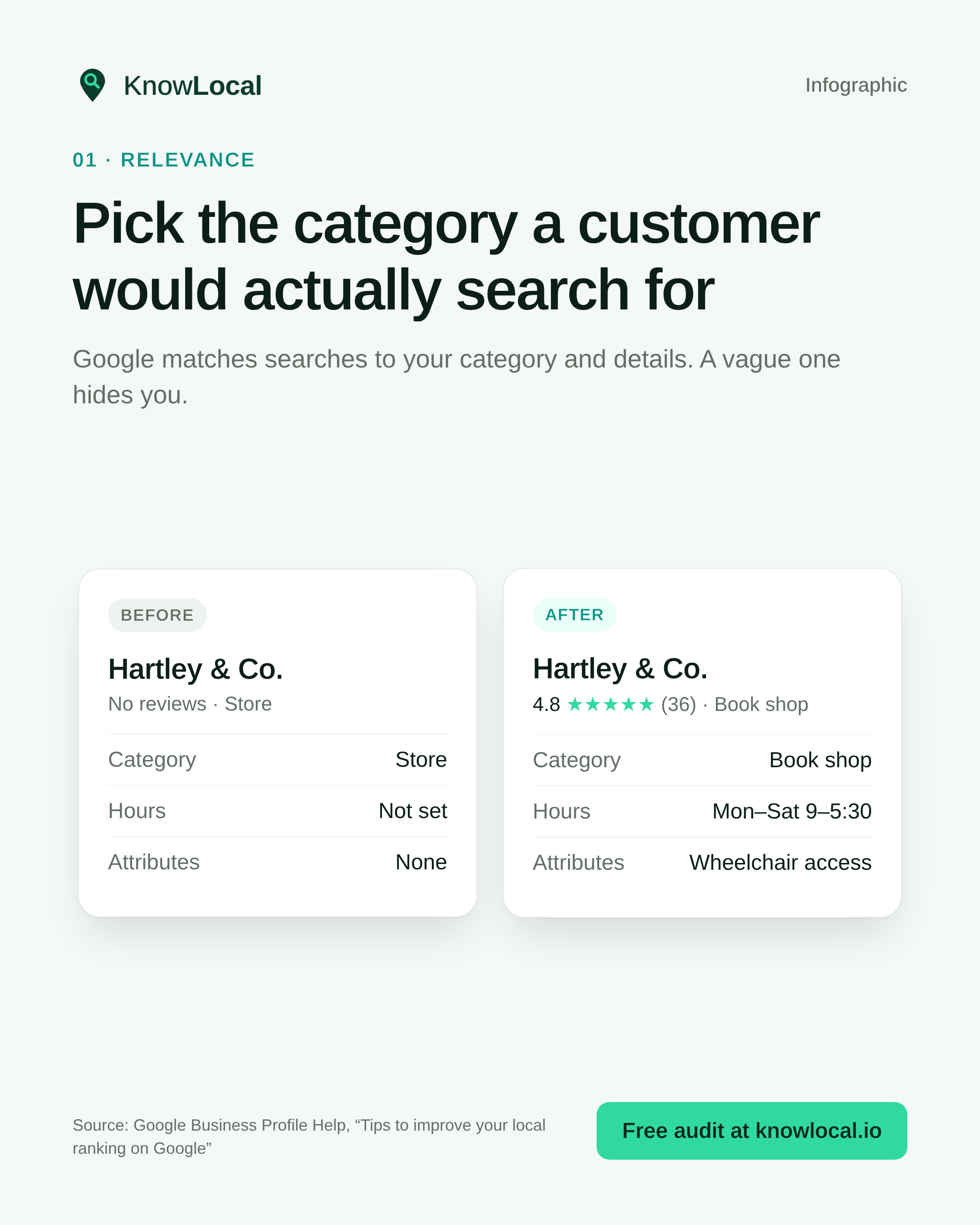
Google: “Relevance is how well a Business Profile matches what someone is searching for.”
A vague primary category (“Store”) and empty hours or services give Google less to match. A customer searching “book shop” is more likely to find a profile that says Book shop, with hours and useful details filled in. Google also says businesses with complete and accurate info are more likely to show in local results.
Distance: you cannot move the high street
Google: “Distance refers to how far each business is from the customer who’s searching.”
You cannot improve distance with keyword tricks. You can make sure Google has the exact address and map pin for the place customers visit. A wrong pin or old unit number costs you nearby searches. That is one of the quiet reasons shops struggle to appear on Google Maps for local queries.
Prominence: how well known are you?
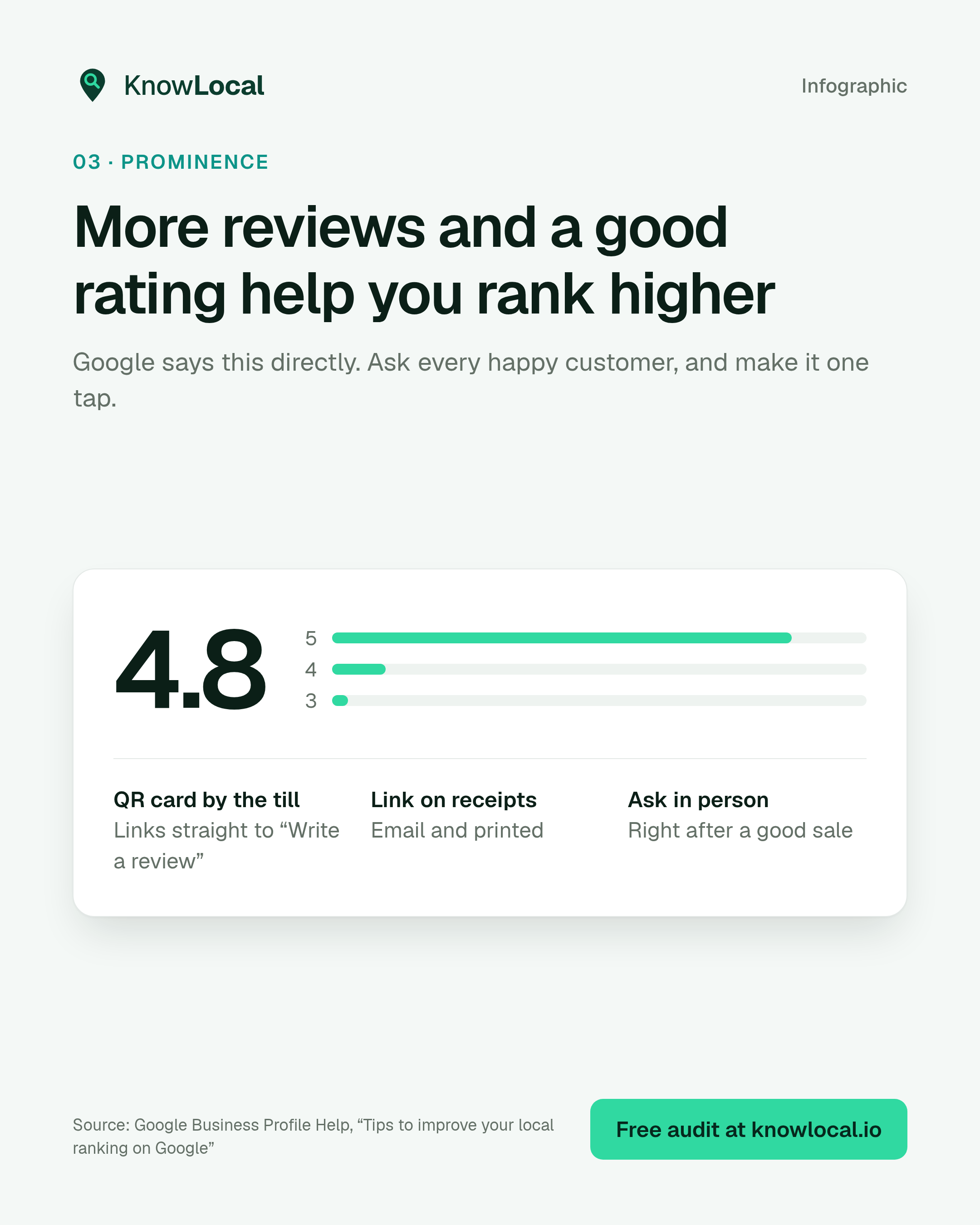
Google: “Prominence means how well-known a business is.” It also says this includes how many websites link to your business and how many reviews you have, and that more reviews and positive ratings can help your business’s local ranking.
That is the lever most independent shops under-work. It needs a weekly habit, not a one-off push.
How to rank higher on Google Maps (and the map pack)
To rank higher on Google Maps and improve Google map pack ranking factors, treat the profile as a weekly habit: exact pin, specific category, complete details, then reviews and replies. Google will not sell you a better spot. The gains come from clearer relevance and stronger prominence over time.
If you want a practical order of work:
- Claim and verify the profile if you have not.
- Fix the pin and address (distance hygiene).
- Set the most specific accurate primary category and complete the profile (relevance).
- Start a steady review ask and reply to every review (prominence).
- Add fresh photos of the shop, team and products.
Ask for reviews at the moment of delight, make it one tap (QR by the till or a direct review link), and never buy reviews or run “review for discount” offers. Those break Google’s review policies. Google says responding to reviews shows you value feedback, and that positive reviews and helpful replies can help your business stand out.
How to appear on Google Maps for the searches that matter
Appearing by name is not enough. To appear on Google Maps for the category searches that bring new customers, Google needs clear relevance signals (right category, services, description) and enough prominence (reviews, reputation, consistent details). Keep your name, address and phone identical on your website and profile.
What to do this week
Thirty focused minutes beat another hour of guessing. Work the list in order: distance hygiene and relevance first, then one concrete prominence action, so you are not spreading effort across tools you do not need yet.
- Verify the profile and check it is not suspended.
- Confirm the pin sits on your shop front.
- Fix primary category + hours + services + attributes.
- Ask five happy customers for a Google review and reply to any open reviews.
- Run a free KnowLocal audit to see which of the three factors is weakest vs nearby shops: start at knowlocal.io.
Sources
- Google Business Profile Help: Tips to improve your local ranking on Google
- Google Business Profile Help: Find your business on Google
- Related: managing reviews, editing your Business Profile
Related KnowLocal guides
- How to rank higher on Google Maps: the 5 levers
- How to get more Google reviews
- Seven common Google Business Profile mistakes
Frequently asked questions
What are Google local ranking factors?
Google says local results are mainly based on relevance, distance and popularity. It explains the third under Prominence: how well known a business is, including reviews and links from other sites.
Why is my business not showing on Google Maps?
Search your exact business name first. If you appear by name but not for category searches, it is usually a ranking issue (relevance and prominence). If you do not appear by name, check verification, suspension, duplicates, or a recent edit still updating. Google says changes can take up to three days, and new businesses can take up to a month to rank.
How does Google rank local businesses?
By matching your Business Profile to the search (relevance), how far you are from the searcher (distance), and how well known you are through reviews, ratings and web reputation (prominence).
How can I rank higher on Google Maps?
Fix an exact address and pin, set the most specific accurate primary category, complete your profile, then build a steady review and reply habit. Google says you cannot pay for a better local ranking.
How do I appear on Google Maps for “near me” searches?
Being findable by name is not enough. Use the right category and complete details so Google can match category searches, and grow reviews so you have enough prominence to compete in the map pack.
Can I pay Google to rank higher in the local pack?
No. Google’s Business Profile Help states there is no way to request or pay for a better local ranking on Google.
Run your free audit
See which of the three local ranking factors is holding your shop back, free, in about 60 seconds.
Run free audit or buy credits →